
 Requirements
 Download
 Old Versions
 Read Me
 Manual
 Repository
 Appcast
 AppleScriptHTML
AppleScriptHTML converts AppleScript source code to HTML representing styles and formatting.
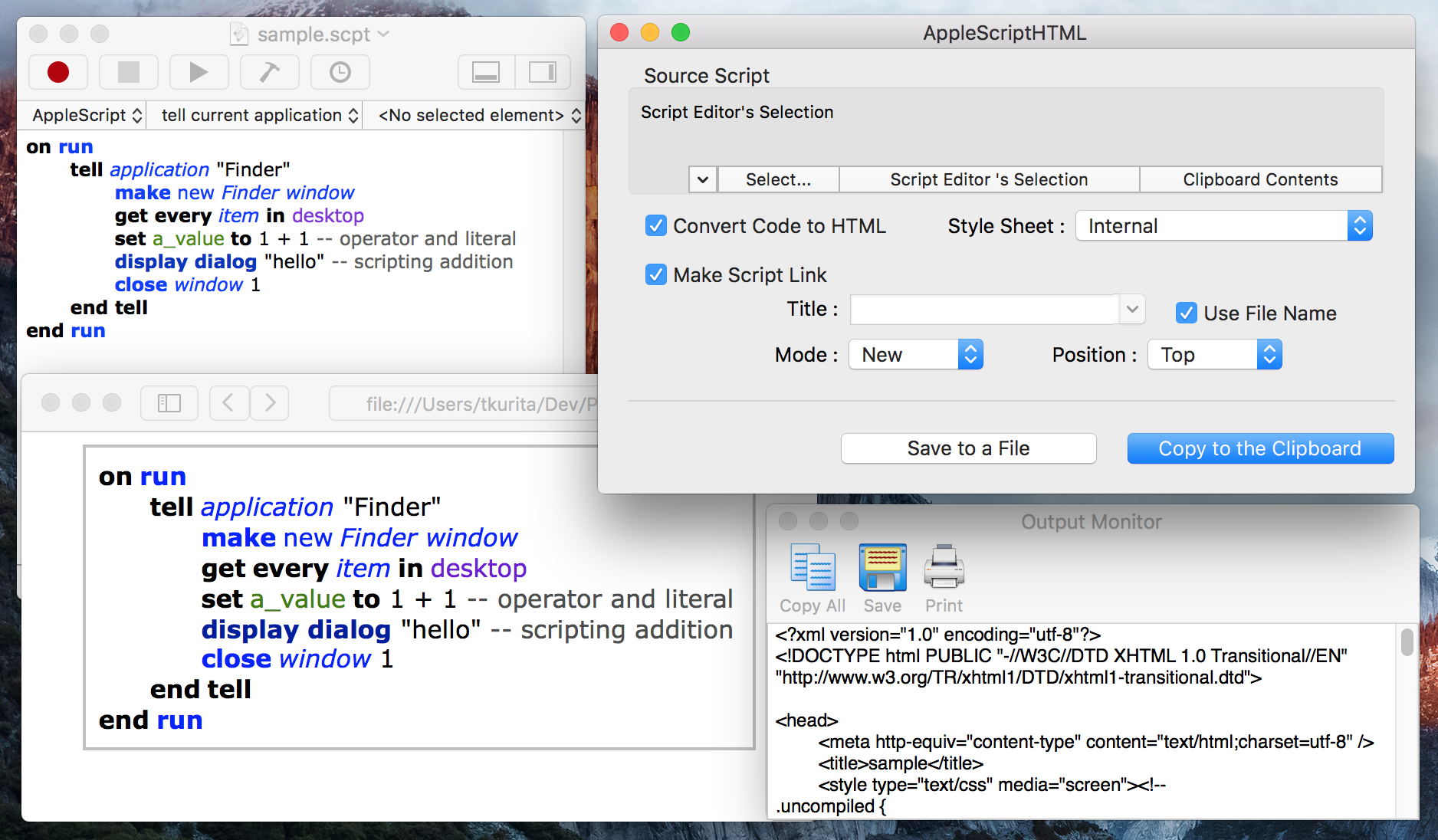
AppleScriptHTML's features are
- Clean HTML
- Styles are applied by Cascading Style Sheets. It is easy to customize styles of output HTML.
- Script Link
- Can adding a link to open the AppleScript code in Script Editor. This function is useful for displaying sample codes.
History
- 2.8 -- 2019-08-09
- Sandboxed version has been distributed in Mac App Store.
- Sparkle framework is updated to version 1.21.3.
- 2.7.3 -- 2018-12-13
- Fixed : when the code contains "=", the script link does not work (Thanks to fix-san).
- Sparkle framework is updated to version 1.21.
- 2.7.2 -- 2016-10-26
- Disable full screen mode.
- Diable window tab bar (Thanks to fix-san).
- Fixed a problem of code signing (Thanks to Phil).
- Fixed : .applescript file could not processed.
- Fixed : spell mistakes (Thanks to Edmund).
- Fixed the localization of the error message of "Copy to the Clipboard" action (Thanks to fix-san).
- Fixed the error message of "Save to a File" action (Thanks to fix-san).
- Fixed the behavior of the history of script link title (Thanks to fix-san).
- 2.7.1 -- 2016-10-21
- Fixed : generated HTML is invalid when the style sheet setting is "None".
- Enable to set position of a script link even if the style sheet setting is "None".
- 2.7 -- 2016-10-18
- Added code signing.
- Changed CSS when the setting of the position of the script link is "Top".
- "%s" in a title text of a script link will be replaced with a file name.
- Fixed : output of "Save to File" action is not display in the monitor window.
- 2.6.2 -- 2016-04-29
- Fixed : progress indicators is not displayed.
- Fixed : error when "Save to File" is performed against to unsaved documents of Script Editor.
- 2.6.1 -- 2016-02-24
- Fixed : "Copy To Clipboard" action cause to crash.
- 2.6 -- 2016-02-10
- Clean up an modernize source code.
- OS X 10.8 or later is required.
- 2.5.2 -- 2013-06-29
- Fixed : <html> and <body> tags are not omitted, when "Copy to the Clipboard" is performed.
- 2.5.1 -- 2013-05-17
- Fixed : Compatibility of script links with Mountain Lion (Thanks to fix-san).
- Fixed : Can't open the preference window (Thanks to fix-san).
- Fixed : Error of "Save to a File" action in 64 bit mode (Thanks to fix-san).
- Fixed : The toolbar item "Copy All" in the output monitor window did not work (Thanks to fix-san).
- Fixed : The toolbar item "Print" in the output monitor window did not work (Thanks to fix-san).
- 2.5 -- 2013-04-19
- Moved to AppleScriptObjC from AppleScript Studio.
- Mac OS X 10.6 or later is required.
- 2.4.1 -- 2012-07-25
-
- Improve compatibility of script links with Mountain Lion.
- '+' characters in a script will be escaped.
- Improve compatibility of script links with Mountain Lion.
- 2.4 -- 2012-07-04
- Added support of inline style sheets.
- Fixed : The default file name for "Save to File" action was invalid when the current mode is "AppleScript Editor's Selection" or "Clipboard Contents".
- Fixed : The progress indicator did not stop when "Save to File" is canceled.
- 2.3 -- 2012-06-05
- Fixed : "Cancel" button of file save panel did not works.
- .applescript files can be processed.
- Text in the clipboard can be processed.
- 2.2 -- 2012-05-23
- Category names of AppleScript's syntax coloring reflects in the CSS setting table reflects style attributes (fonts, colors and so on).
- CSS can be generated by the "Generate CSS" button in the "Preferences" window.
- "Output Monitor" window has a toolbar.
- "Copy All" and "Save" action can be performed from the toolbar.
- 2.1.3 -- 2012-04-03
- The application icon is updated. The maximum size is 1024 px. (Thanks to wakaba-san).
- Fixed : The default css class name had missing entry.
- Changed : "Script Editor" is changed to "AppleScript Editor".
- Improved : The layout of Help is changed for readability in small window.
- 2.1.2 -- 2010-03-20
- Fixed : "Save to File" button did not work (Thanks to Yves Gesnel).
- Fixed : A script link for a script including single quotes did not work.
- 2.1.1 -- 2010-03-15
- AppleScriptHTML has a custom icon (Thanks to wakaba-san).
- Fixed : Output of multi paragraphs was not enclosed with <div class="sourceCode">, when the "Script Link" option was off.
- 2.1 -- 2009-10-26
- Supported Mac OS X 10.6.
- Unsupported Mac OS X 10.4.
- CSS class names are customizable.
- 2.0.7 -- 2009-06-15
- Can works with application type AppleScript.
- Fix an error when dropping files to the window.
- Add self-update function using Sparkle framework.
- 2.0.6 -- 2008-12-29
- Fix processing ScriptEditor's selection.
- 2.0.5 -- 2008-12-22
- The behavior of the default location to save files can be customizable in the preferences window.
- 2.0.4 -- 2008-12-10
- 2.0.3 -- 2008-12-05
- Add "Output Monitor" window (Thanks to fix-san).
- Fix an error when converting one line script.
- 2.0.2 -- 2008-12-05
- Fix position of the script link button when CSS is not generated.
- A saved file in Desktop folder will be displayed in Mac OS X 10.5 (Thanks to fix-san).
- 2.0.1 -- 2008-12-03
- Support Mac OS X 10.5
- 2.0 -- 2008-11-26
- First release with English manual.